
How to Buy a Wood-Cutting CNC Router Machine: 9 Steps to a Smart Investment
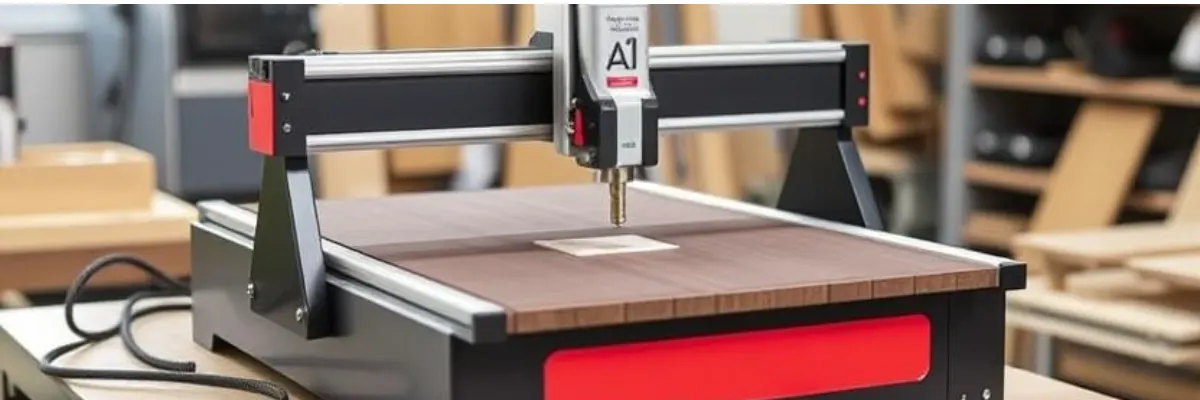
Key takeaways
- Choose the bed size from your largest sheet, plus room for loading.
- Check frame, gantry and motion components – not just the spindle rating.
- After-sales support and spares matter as much as the price.
A CNC router is one of the most valuable tools in a modern woodworking shop. Whether you're building cabinets, signs, furniture, or custom art pieces, investing in the right machine upfront will save you time, money, and frustration down the line.
Here’s a step-by-step guide to help you choose the best CNC router for your woodworking needs—whether you're a startup, scaling a custom shop, or upgrading from a manual workflow.
1. Define Your Production Requirements
Before comparing specs, start with what matters most: your work.
- Workpiece Size:
Do you need to cut full 4′×8′ sheets (e.g., plywood or MDF panels) or smaller blanks? - Material Types:
Will you be working with solid wood, MDF, plywood, acrylic, or all of the above?
Different materials require different spindle speeds and bit types. - Production Volume:
Are you producing one-offs, small batches, or full-scale cabinet runs?
Higher throughput demands automation and rugged components.
2. Determine Key Machine Specifications
Axes & Travel
- Standard machines operate in 3-axis (X, Y, Z).
- Add a 4th rotary axis if you plan to engrave or mill cylindrical parts.
Spindle Power & Speed
- 2–5 HP: Good for hobbyists or light commercial work.
- 7–12+ HP: Needed for full-speed MDF cutting or hardwood carving.
- Speed range: 8,000–24,000 RPM for clean cuts without burning edges.
Table Type & Workholding
- T-slot Tables: Use clamps, fixtures—great for small parts and thick materials.
- Vacuum Tables: Fast sheet loading, ideal for cabinetry and sign-making.
3. Assess Control System & Software Compatibility
- Controller Types:
Popular options include Mach3/4, Centroid, or proprietary OEM systems.
Prioritize ease of use, documentation, and local support. - CAM Software:
Ensure the machine integrates with packages like VCarve, Aspire, Fusion 360. - Connectivity:
USB, Ethernet, or wireless for transferring G-code files—ensure it's reliable and secure.
4. Inspect Build Quality & Motion Components
Frame & Gantry
- Look for welded steel or heavy-duty aluminum.
- Cross-bracing helps reduce vibration and increase precision.
Linear Motion
- Ball screws (on Z-axis) offer high accuracy.
- Rack & pinion (on X/Y) is faster for long-distance travel.
- All axes should have quality linear guide rails for repeatability.
Cable Management
- Machines should include drag chains and cable carriers to protect wiring from dust and motion stress.
5. Compare Features & Optional Upgrades
- Automatic Tool Changer (ATC):
Saves time on jobs requiring multiple bits—great for production shops. - Tool Length Probing:
Speeds up setup and ensures consistency across jobs. - Integrated Dust Collection Ports:
Keep your work area clean and prolong machine life. - Safety Guards or Enclosure:
Helps reduce noise and contain debris.
6. Budgeting & Total Cost of Ownership
Factor in more than just the sticker price:
- Base Machine Price + Options
(ATC, vacuum table, spindle upgrade, probing) - Installation Costs
(rigging, power setup, dust collection) - Recurring Costs
(router bits, collets, spindle bearings, lubrication) - Training & Support Packages
Onboarding and preventive maintenance may require upfront or annual investments.
7. Research Vendors & After-Sales Support
Authorized Dealers
- Provide warranties, training, refurbishment, and on-site tech support.
Ask for References
- Visit a nearby shop using the same model.
- Ask about cut quality, service responsiveness, and uptime.
Factory Direct vs. Local Support
- Factory direct may be cheaper—but local resellers often provide faster service and spare parts.
8. Request a Demo & Sample Cut
- Inspect the Machine:
Review weld quality, component layout, gantry stiffness, and cable routing. - Bring Your Files:
Load your actual design and run a test cut to assess speed, edge quality, and accuracy. - Test the Controller:
Walk through common workflows—jogging, setting Z-zero, and loading programs.
9. Finalize the Purchase & Plan the Setup
Warranty Terms
- Seek at least 12 months on critical components.
- Ask if there’s a cut-quality return window or “try-before-you-buy” option.
Site Preparation
- Confirm electrical specs (amps, phase, voltage), floor strength, and dust collection ducts.
Operator Training
- Schedule hands-on instruction covering:
- Basic operation
- Tool changing
- Maintenance routines
- Emergency procedures
Final Checklist: CNC Router Buying Essentials
| Category | What to Confirm |
|---|---|
| Size & Capacity | Will it fit your biggest sheet goods or parts? |
| Materials & Power | Is the spindle powerful enough for hardwoods/MDF? |
| Workholding | Do you need clamps, T-slots, or a vacuum table? |
| Software Integration | Compatible with your CAM package? |
| Support Availability | Local service techs and spare parts? |
| Future-Proof Features | ATC, dust extraction, safety enclosure, probing? |
Need a machine for this?
Tell us your part, material and quantity. We will suggest suitable new and used machines with prices.
Questions about this topic
What bed size do I need for a CNC router?
At least your standard sheet size – 8 × 4 ft (2440 × 1220 mm) for most panel work.
Which software do CNC routers use?
Most use CAD/CAM software to create toolpaths and a controller that reads G-code. Check that your designers can use it.
Can you source a CNC router for us?
Yes – tell us the sheet size, materials and volumes, and we will suggest options.
Machines related to this guide
No machines match these filters. Tell us what you need and we will find one.
Talk to a CNC machine specialist
Send a drawing or just the part size and quantity – we will tell you which machine fits and what it costs.